
Developer’s Diary of VBox Manual: Chapter 3
The Drillarium Dashboard introduces a new way of monitoring and controlling the playout of many different broadcast channels by a single operator. Designed as a configurable and intelligent GUI, it works by exception, showing only what is different than it should be and thus saving the operators of an avalanche of useless information. Once a problem has been identified, Drillarium guides the operator in the diagnosis and solution.
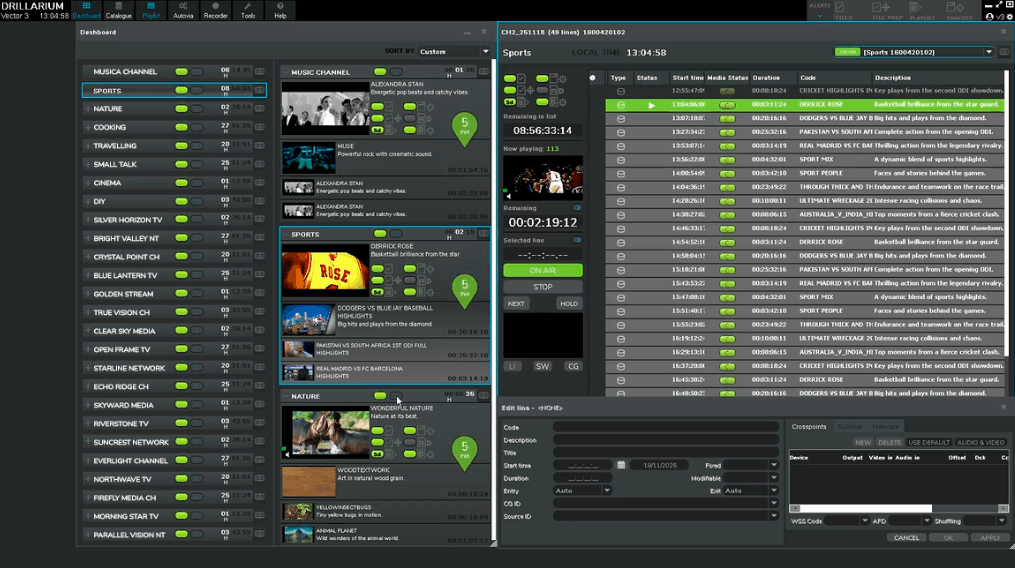
Drillarium Dashboard, presents channels through three different levels of compactness: ultra-compact, collapsed, and playlist. This layered approach allows operators to decide how much information from the channel they want to view at any moment. In the ultra-compact mode, each channel is reduced to its essentials; a single LED icon showing its overall status and a countdown indicating the time left before the next event. With just a glance, an operator can understand overall channel health: green signifies that everything is running smoothly, orange signals a warning, and red indicates an error. It’s a streamlined view designed for fast decision-making.
For situations that demand deeper information without overwhelming the operator, the collapsed mode offers an elegant balance between detail and space. Expanding a channel with a click reveals its key data while maintaining a tidy layout. The general status LED remains visible at the top, reinforcing the quick color-coded overview. On the left, thumbnails display the current and upcoming events along with their durations, and when the current program is live, the thumbnail can be replaced with the actual signal feed. Event names and durations are shown clearly for future items, while the currently active program displays its title. This mode gives operators a fuller picture of what is happening now and what is coming next, all while keeping the screen efficient and uncluttered.
When operators need complete access to a channel’s structure, double-clicking any thumbnail opens the full playlist. This seamless action connects the high-level overview to the detailed content list, allowing precise control and quick adjustments whenever required. The transition feels natural, and the operator stays fully oriented within the workflow.
By combining visual simplicity with depth of information, the Drillarium Dashboard introduces a fresh, intuitive way to manage multiple channels. It is designed to reveal what matters most the moment it matters, while still offering the freedom to explore and control every element of the system. For those seeing it for the first time, it sets a new expectation for how a multi-channel environment can be monitored; clear, compact, and instantly actionable.